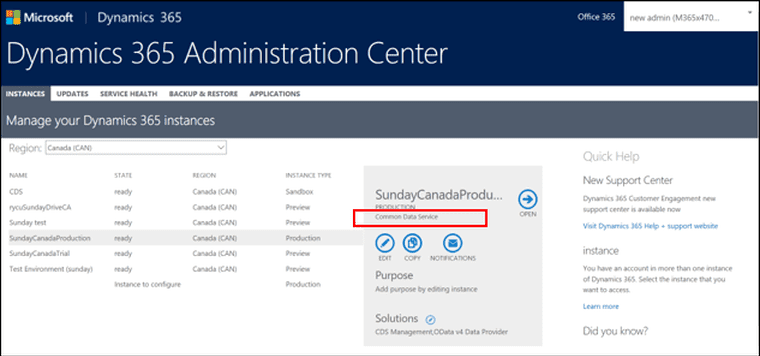
With the introduction of Common Data Services for Apps, which relies on the same platform as Dynamics 365 for customer engagement, PowerApps users will be able to create Common Data Service instances. As a tenant administrator or Dynamics 365, you can control and manage them.
If your company has multiple environments and instances, we give administrators the ability to filter the list of instances on the types of instances you’re interested in: Production, Sandbox, Trial or other instance types.
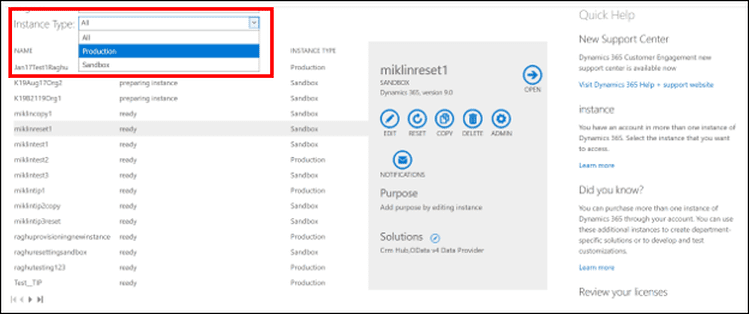
The screenshot below shows an example of an administrator selected to filter “Production.” This helps manage the instances your company uses in production. Similarly, if you want to see and manage your Sandbox or Trial environments, set the filter accordingly. Moreover, it is not necessary to go through instances of several types.
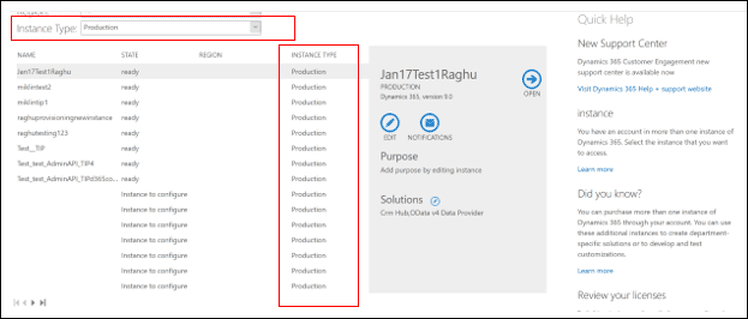
In addition, Dynamics 365 User Licenses and SKU units were equipped with PowerApps (and Microsoft Flow) capabilities from the outset.
In fact, we made them available in the old Dynamics CRM user licenses. What is different now is that when a PowerApps user who writes model-driven applications creates a database under his or her environment, they commission a Common Data Service instance that operates the same platform as Dynamics 365 for Customer Engagement. Depending on the user’s license, they can create an instance. The latter may be a production instance or a common data service instance. For more information on the features of the Common Data Service instance, see The Environment Presentation section.