AI Action Center by Masao

AI Action Center by Masao
Turn every incoming email into relevant CRM actions
The AI Action Center is an artificial intelligence agent designed to help sales and customer service teams handle their incoming emails faster.
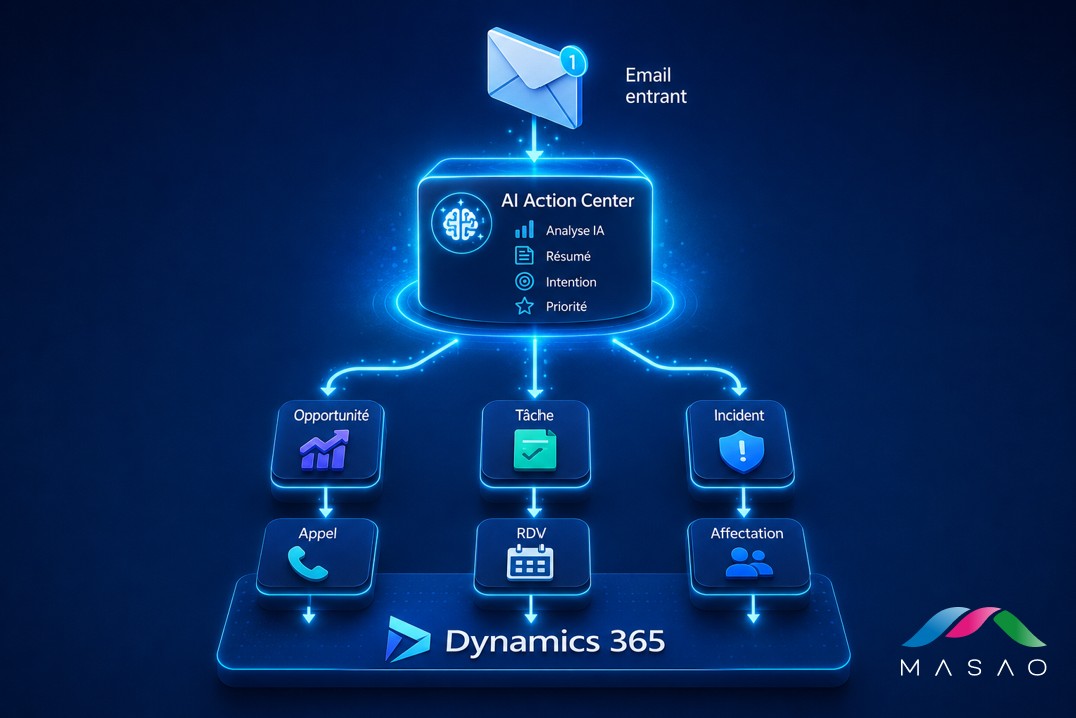
Each message is analysed automatically to understand its context, identify the sender’s intent, assess its priority level and recommend the most relevant business action.
Suggestions are displayed directly in Microsoft Dynamics 365, in a clear and modern dashboard. Users stay fully in control: they can approve, dismiss or adjust each recommendation before anything is created or updated in the CRM.
The AI Action Center in action
Turn your emails into business actions

Model
Azure OpenAI to understand email content, detect intent and generate contextual recommendations

Trigger
Automatic when a new email arrives in Outlook or Exchange

Agent type
Semi-autonomous
Decision-support agent
Human in the Loop

Technology
Microsoft Dynamics 365
Microsoft Dataverse
Microsoft Copilot Studio
Azure OpenAI
Power Automate
Outlook / Exchange
How it works:
When an email arrives, the agent:
- automatically analyses the content of the message
- generates a clear, concise summary
- identifies the sender’s intent
- assesses the priority level
- calculates a confidence score
- recommends the most relevant business action
- explains the reasons behind its recommendation
- displays the related CRM information
- waits for the user’s approval
- creates or updates the data in Dynamics 365 once approved
Result: every email becomes a structured, prioritised recommendation that can be used directly in the CRM.


What value for users and managers?
- Less time spent qualifying emails
- Immediate prioritisation of important requests
- Fewer oversights and processing delays
- More consistent actions across teams
- Better CRM data quality
- Faster detection of sales opportunities
- Better visibility of incoming requests
- Decisions always approved by the user

An experience built into Dynamics 365
The AI Action Center dashboard shows:
- the AI-generated summary
- the detected intent
- the priority level
- the confidence score
- the recommended actions
- the explanation provided by the AI
- the related CRM information
- the approval status of the recommendation.
Users work directly in their Dynamics 365 environment, without switching tools or juggling interfaces.

Ready to get started?
Stop wasting time qualifying every incoming email by hand.
Analyse requests, identify priorities and automatically turn incoming messages into actionable tasks in Microsoft Dynamics 365.